 Chat with us
How to Fix Data Synchronization Issues Between CRM and ERP Systems Using Node.js
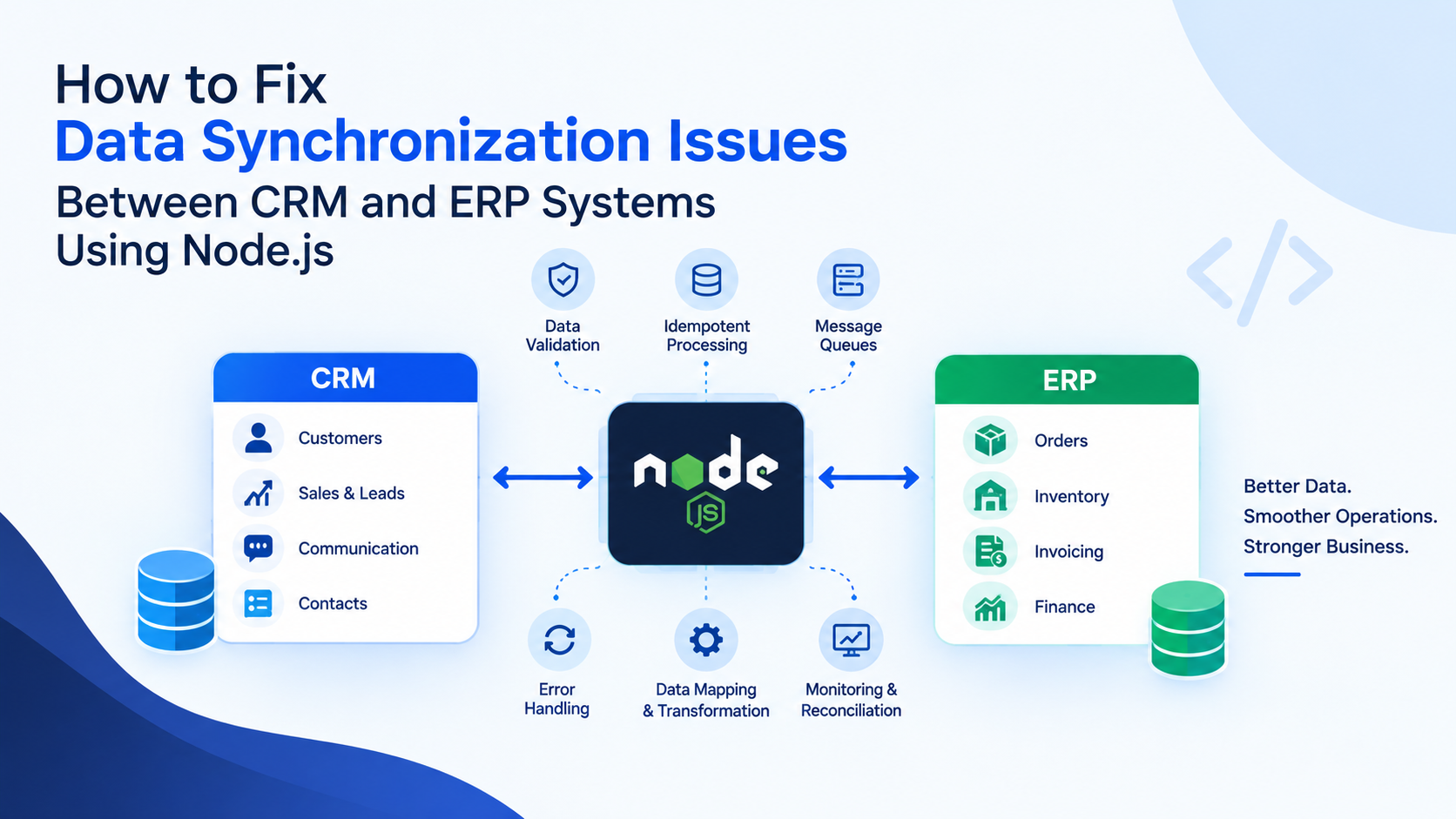
CRM and ERP systems manage different but closely connected business operations. A Customer Relationship Management (CRM) platform stores customer information, sales activities, leads, and communication history, while an Enterprise Resource Planning (ERP) system manages orders, inventory, invoicing, procurement, and financial records.
When these systems fail to synchronize correctly, businesses may encounter duplicate customer records, outdated order statuses, incorrect inventory information, and mismatched invoices. These issues can affect customer experience, operational efficiency, and business reporting.
Node.js can help businesses build reliable integrations between CRM and ERP platforms through APIs, asynchronous processing, event-driven architecture, and automated error recovery. However, successful integration requires more than transferring data between two systems. It requires consistent data rules, reliable synchronization mechanisms, and effective monitoring.
Why Do CRM and ERP Data Synchronization Issues Occur?
Data synchronization problems often arise when CRM and ERP systems use different data formats, database structures, business rules, or update schedules.
For example, a sales representative may update a customer's billing address in the CRM, while the ERP continues using the previous address. Similarly, an order marked as confirmed in the CRM may not appear in the ERP because an API request failed.
Common CRM and ERP integration challenges include:
- Duplicate customer and supplier records caused by repeated API requests.
- Missing updates due to network failures or API timeouts.
- Inconsistent customer IDs, product codes, and order references.
- Conflicting changes when users update the same record in both systems.
- API rate limits that delay large synchronization jobs.
- Incorrect field mapping between CRM and ERP databases.
- Failed background jobs that remain undetected.
Identifying the underlying cause is the first step toward building a reliable CRM and ERP integration solution.
Use Node.js APIs for Reliable Data Integration
Node.js is well suited to integration services that communicate with multiple systems through REST APIs, webhooks, and asynchronous operations.
A Node.js integration layer can receive updates from a CRM, validate the data, transform it into the ERP's required format, and send it to the destination system. The same process can work in reverse when ERP changes need to be reflected in the CRM.
For example, when a sales opportunity becomes a confirmed order, the integration service can transfer the customer reference, product details, pricing, and order information to the ERP.
Using a dedicated integration layer also helps businesses centralize authentication, validation, logging, retry policies, and error handling rather than scattering integration logic across multiple applications.
Developers should use the APIs and integration mechanisms officially supported by the selected CRM and ERP platforms.
Establish Consistent Data Mapping and Validation
Data mapping errors are a major source of synchronization failures. CRM and ERP systems may represent the same business information differently.
A CRM might store a customer as an account with a unique CRM ID, while the ERP identifies the same customer using an account number. Product names, tax fields, currency formats, and order statuses may also differ.
To prevent these issues, define a field-mapping specification that identifies the source field, destination field, data type, transformation rules, and validation requirements.
A Node.js development services can validate incoming payloads before transferring them. Invalid email addresses, missing customer references, unsupported currencies, or incorrectly formatted dates should be rejected or routed for correction.
Maintain a cross-reference between CRM and ERP record IDs to ensure that updates affect the correct business entity. Where possible, use stable external identifiers instead of relying on names or email addresses alone.
Prevent Duplicate Records with Idempotent Processing
Repeated API calls can create duplicate customers, orders, and invoices if the integration does not recognize previously processed requests.
Node.js developers can prevent this by implementing idempotent processing. Each synchronization event or business operation should have a stable identifier that allows the service to recognize duplicate requests.
For example, before creating an ERP order, the integration can check whether the corresponding CRM order ID already exists in the ERP. A database unique constraint or an equivalent destination-system rule should enforce uniqueness even when multiple requests arrive simultaneously.
Webhook events should also be deduplicated using their event IDs where available.
Importantly, a simple check followed by an insert may still fail under concurrent requests. Combine application-level checks with database constraints or atomic destination-system operations to provide stronger protection.
Use Queues and Retry Mechanisms for Failed Synchronization
Synchronous integrations can become unreliable when one system experiences downtime or slow API responses. If the destination system is temporarily unavailable, a synchronization request may fail before the update reaches its destination.
A message queue, such as RabbitMQ, or a streaming platform such as Kafka can help decouple the CRM from the ERP. A Node.js worker processes queued events independently and retries temporary failures without requiring the user to repeat the original action.
Use bounded retries with exponential backoff for temporary network failures, server errors, and rate-limit responses. Respect API-provided retry instructions when available.
Permanent failures, such as invalid customer references or unsupported field values, should be sent to a dead-letter queue or error-management workflow for investigation.
For business-critical operations, maintain processing status and ensure that a failed worker can resume safely without duplicating completed transactions.
Resolve Conflicting Updates with Clear Data Ownership
Synchronization becomes more complicated when users can edit the same information in both systems.
For example, the CRM team might update customer contact details while the finance team modifies billing information in the ERP. Automatically allowing the latest update to overwrite every field can cause data loss.
Define ownership rules for each data category. The CRM may be the authoritative source for sales contacts and lead information, while the ERP may control invoice status, inventory quantities, and financial records.
Use version numbers, timestamps, or optimistic concurrency controls when supported by the systems. For sensitive fields, conflicting changes should be flagged for review instead of silently overwriting existing values.
Clear ownership rules help maintain data consistency across connected business applications.
Monitor Synchronization and Reconcile Records
Even a well-designed integration needs monitoring. Track failed API requests, queue backlogs, synchronization delays, duplicate events, and records that repeatedly fail validation.
Store structured logs containing correlation IDs, source record IDs, destination record IDs, processing status, and error details. Avoid logging passwords, access tokens, payment details, or unnecessary personal information.
Scheduled reconciliation jobs can compare important CRM and ERP records to identify missing orders, mismatched customer references, and incorrect status values. These checks help detect problems that ordinary API logs may not reveal.
Test the integration against realistic scenarios, including API downtime, rate limiting, duplicate webhooks, simultaneous updates, and partial failures.
Build Reliable CRM and ERP Integrations with Node.js
Fixing data synchronization issues between CRM and ERP systems requires a combination of accurate data mapping, idempotent processing, asynchronous queues, conflict resolution, and continuous monitoring.
Node.js provides a flexible foundation for developing custom CRM and ERP integration services that connect business applications and automate data exchange. The right architecture depends on transaction volume, platform capabilities, business rules, and recovery requirements.
Askzenix Technologies helps businesses develop and integrate software solutions, APIs, and backend applications tailored to their operational requirements. A carefully designed integration can reduce manual data entry, improve reporting accuracy, and help sales, finance, and operations teams work with consistent information.
Planning to connect your CRM and ERP systems? Review your current data flows, identify recurring synchronization failures, and establish clear rules for validation, record ownership, and error recovery before scaling the integration.