 Chat with us
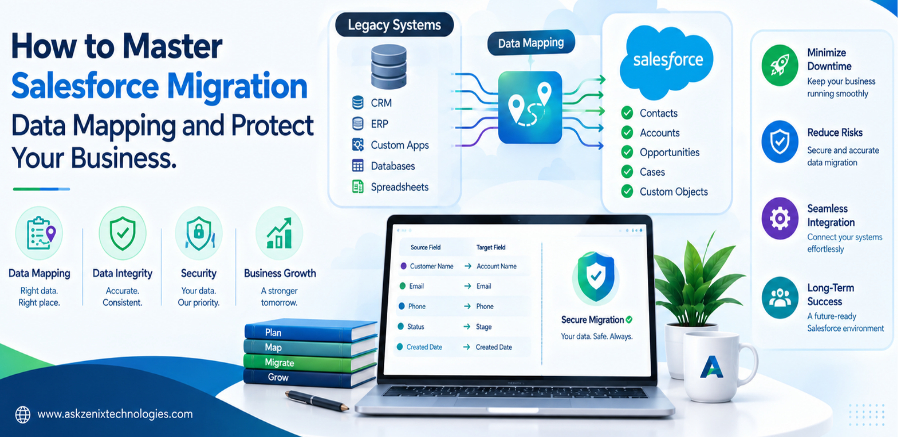
How to Master Salesforce Migration Data Mapping and Protect Your Business
Salesforce migration is more than transferring customer records from one system to another. Businesses often have years of customer information, sales history, service records, account details, and operational data stored across CRM platforms, databases, spreadsheets, and third-party applications. Moving this information without proper planning can result in data loss, duplicates, broken relationships, and reporting problems.
This makes Salesforce migration data mapping one of the most important parts of a successful CRM migration.
Data mapping defines how information from a source system corresponds to objects, fields, and relationships in Salesforce. A well-planned mapping strategy helps businesses maintain data accuracy, protect sensitive information, and ensure that employees can continue using the CRM effectively after migration.
What Is Salesforce Migration Data Mapping?
Salesforce migration data mapping is the process of matching fields and objects in a source system with their corresponding fields and objects in Salesforce.
For example, a legacy CRM might have a field called “Company Name,” while Salesforce uses “Account Name.” Although the field names are different, they may represent the same business information.
Mapping establishes this relationship and determines how the data should be transferred.
The process may involve standard Salesforce objects such as Accounts, Contacts, Leads, Opportunities, and Cases, as well as custom objects and fields. It can also involve transforming data when the source format does not directly match the Salesforce configuration.
Why Data Mapping Matters in Salesforce Migration
Incorrect data mapping can create problems that may not become obvious immediately after migration.
Customer records could be assigned to the wrong accounts, important fields could remain empty, duplicate records could increase, and relationships between Accounts, Contacts, Opportunities, and Cases could be lost.
These problems can eventually affect sales operations, customer service, reporting, forecasting, and management decisions.
A structured mapping process gives the migration team a clear understanding of what data is being transferred, where it should go, and what changes are required before it enters Salesforce.
Start With a Detailed Data Assessment
Before creating a migration plan, businesses should evaluate their existing data.
This includes identifying all source systems, databases, objects, tables, fields, data types, relationships, record volumes, duplicate records, outdated information, and historical data.
This assessment also helps determine what information actually needs to be migrated.
Not every field from a legacy system needs to be moved into Salesforce. Transferring unnecessary or obsolete information can increase complexity and make the new CRM harder to manage.
Businesses should categorize data into information that must be migrated, information that requires transformation, information that should be archived, and information that can be excluded.
Create a Clear Field Mapping Strategy
A detailed field mapping document should serve as a reference throughout the migration.
It should identify the source object, source field, Salesforce object, Salesforce field, data type, transformation requirements, validation rules, and any special migration considerations.
Business stakeholders should participate in this process because technical similarities do not always represent the same business meaning.
For example, two fields may both contain text values but serve completely different purposes within the business. Understanding the context behind the data is essential for accurate mapping.
Preserve Relationships Between Records
Salesforce relies heavily on relationships between records. Accounts may be connected to Contacts, Opportunities, Cases, Activities, and custom objects.
These relationships need to be carefully maintained during migration.
Stable identifiers such as external IDs can help migration teams associate source records with their corresponding Salesforce records.
For example, when an Account is migrated and receives a new Salesforce ID, related Contacts need a reliable way to identify that Account. Without proper relationship mapping, Contacts could become disconnected or linked to an incorrect customer.
Relationship mapping should therefore be planned before importing large volumes of data.
Clean and Standardize Data Before Migration
Migrating poor-quality data does not improve data quality. It simply moves existing problems into the new Salesforce environment.
Legacy systems frequently contain duplicate customers, inconsistent addresses, outdated contact information, different date formats, and variations in country or industry names.
Data cleansing should therefore be included in the migration strategy.
For example, one system might use “USA,” another “United States,” and another “US.” Standardizing these values before migration can improve reporting, segmentation, and data consistency.
Duplicate detection and data validation are equally important when multiple systems are being consolidated.
Manage Picklists and Data Transformation Carefully
Picklist values are another area where migration teams need to pay close attention.
A source system might contain values such as “Active,” “Ongoing,” and “In Progress,” while the Salesforce environment may use a different standardized set of values.
The migration process should define exactly how each source value corresponds to the Salesforce value.
Similar attention should be given to dates, currencies, phone numbers, addresses, Boolean fields, names, and other structured data.
Every transformation should be documented so that the migration remains transparent and repeatable.
Protect Business and Customer Data
Salesforce migrations can involve sensitive customer, employee, financial, and business information. Security should therefore be considered throughout the migration process.
Access to exported data and migration files should be limited to authorized personnel. Temporary files should be stored securely and removed when they are no longer required.
Organizations should also review Salesforce permissions, roles, sharing settings, authentication controls, and other security requirements before the new environment becomes operational.
Protecting data should not be treated as a final migration activity. It should be part of the entire migration lifecycle.
Test Before Moving to Production
A test migration can identify problems before they affect real business operations.
Migration teams should test a representative sample of records and verify field values, relationships, ownership, validation rules, automation, reports, dashboards, and integrations.
Business users should also participate in testing. Technical validation can confirm that records were successfully imported, while business validation determines whether the information actually works for everyday processes.
Testing should cover important scenarios such as searching for customers, reviewing sales opportunities, accessing service histories, generating reports, and running automated workflows.
Validate the Data After Migration
A successful data load does not automatically mean a successful migration.
After migration, businesses should compare source and target data and verify important record counts, required fields, relationships, ownership, and values.
Critical reports and dashboards should also be reviewed to identify potential mapping or transformation problems.
Post-migration validation provides greater confidence that the Salesforce environment is ready for business use.
Common Salesforce Migration Mistakes to Avoid
Several mistakes can undermine an otherwise well-planned Salesforce migration.
Starting the migration without properly understanding the source data is one of the most common problems. Mapping fields based only on similar names rather than business meaning can also create inaccurate results.
Other risks include ignoring duplicate records, migrating unnecessary information, failing to preserve relationships, overlooking security requirements, and conducting insufficient testing.
Clear documentation, data cleansing, business involvement, testing, and validation can significantly reduce these risks.
Conclusion
Salesforce migration data mapping provides the foundation for a reliable CRM transition. It helps businesses determine what data should be moved, where it belongs, how it should be transformed, and how its accuracy will be verified.
The objective should not simply be to transfer as much data as possible. The goal is to create a Salesforce environment where information is accurate, connected, secure, accessible, and useful.
Businesses planning a Salesforce migration should prioritize data discovery, field mapping, cleansing, relationship management, security, testing, and post-migration validation. With the right strategy, organizations can reduce migration risks, protect valuable business information, and build a stronger foundation for future Salesforce growth